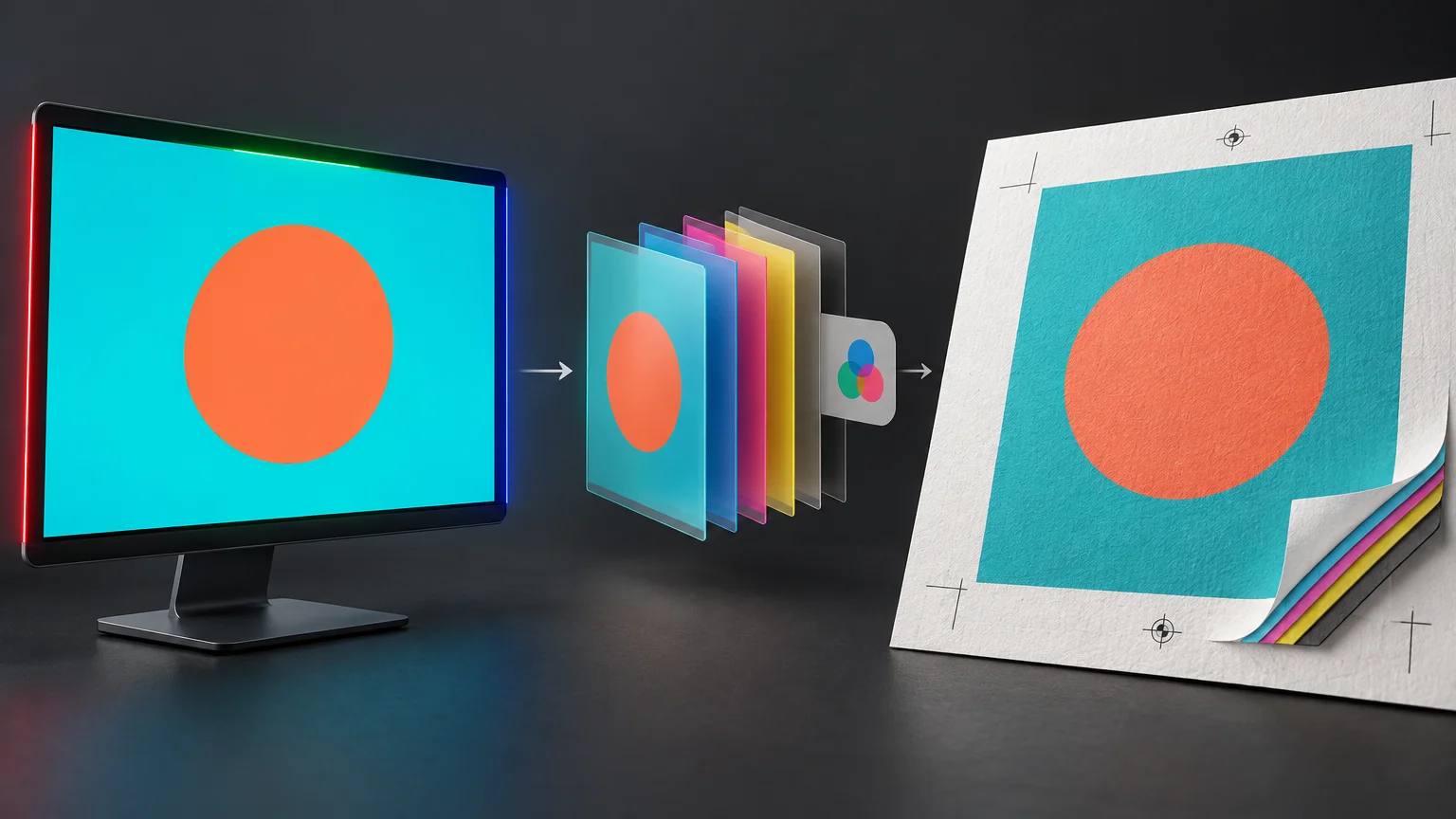
RGB vs CMYK for Printing: What Changes When Artwork Leaves the Screen
TLDR: The practical answer to RGB vs CMYK for printing is to follow the printer’s named workflow. Keep tagged RGB artwork when the provider accepts color-managed RGB. Convert once to a specified CMYK destination when the provider requires process separations. Do not make an arbitrary CMYK conversion merely because the artwork will be printed, and do not allow both the application and printer driver to manage the same conversion.
The important decision is not which three- or four-letter mode sounds more print-ready. It is where color conversion will happen, which output condition it targets, and who controls it. A reliable workflow connects source colors to a particular press, inkset, substrate, profile, and proofing method.
RGB vs CMYK for printing: the production difference
RGB represents color through red, green, and blue light. A display creates lighter colors by emitting more light, with its white produced by the display. CMYK represents process printing with cyan, magenta, yellow, and black inks. Printed color depends on light reflecting from the substrate through or around those ink films. These are different physical systems, but mode alone does not guarantee how a color will appear.
The numbers also need context. An RGB value such as 0, 180, 190 does not describe one universal turquoise. Its appearance depends on its RGB color space and display conditions. CMYK values are likewise device-dependent: the same percentages can produce different appearances under different printing conditions. ICC profiles give those values the color-management context needed to map them between source and destination. The International Color Consortium’s color-management guidance explains this relationship between profiles, devices, and color reproduction.
| Question | RGB artwork | CMYK artwork |
|---|---|---|
| Primary role | Stores color for light-based displays and color-managed source files | Stores process-ink separations for a defined printing condition |
| Where white comes from | The display emits light | The paper or substrate supplies the base white |
| Main advantage | Preserves source data and lets the correct output workflow perform the conversion | Lets prepress inspect and control final process separations |
| Main risk | An unknown downstream conversion can change color unexpectedly | A generic or incorrect conversion can reduce gamut and create unsuitable separations |
| Best use | A printer or RIP explicitly accepts tagged RGB and embedded profiles | A provider supplies a destination profile or explicitly requires CMYK |
| Accuracy rule | Use a defined source profile | Use the profile for the intended output condition |
Why “print means CMYK” is incomplete
A CMYK document can still be poorly prepared. “CMYK” does not identify the press condition, substrate, total ink limit, black-generation method, or expected paper color. Converting to an arbitrary working space may create four channels, but it does not prove that those separations suit the actual job.
A destination profile is associated with a particular output condition. Change from coated stock to uncoated stock, or from paper to vinyl, and the appropriate mapping may change because substrate white and the reproducible gamut change. Printer profiles can also describe devices using more than four inks, so CMYK does not fully describe every digital, inkjet, or expanded-gamut system.
This is why material selection belongs in the color conversation. A bright white coated sheet and a warmer, more absorbent cardstock do not provide the same optical base. If stock is still undecided, review the physical distinctions in this guide to cardstock before treating a soft proof as final.
Choose the conversion point
The safest workflow gives one system responsibility for conversion. Which system should own it depends on the provider’s instructions.
When the provider accepts tagged RGB
Preserve the source profile and use the provider’s export preset. A color-managed RIP can then convert the source into the printer’s output space. Adobe supports retaining RGB data in workflows that accept it, including many desktop-printer workflows, because preconverted CMYK may otherwise be transformed again.
When the provider specifies CMYK
If prepress supplies a particular CMYK ICC profile, conversion policy, or PDF preset, convert to that destination once. Inspect the result for out-of-gamut colors, altered neutrals, black construction, and transparency interactions. “Convert to CMYK” without a named profile or output condition is not enough information for color-critical work.
When printing through a desktop driver
Retaining tagged RGB is commonly appropriate when the printer and driver are designed to perform the conversion. If the design application manages color instead, disable color management in the driver where the documented workflow requires it. Allowing both layers to adjust the file can cause unintended double conversion.
When the job uses specialty inks
White, metallic, fluorescent, clear, and spot inks are not ordinary CMYK substitutes. They may require named swatches, dedicated channels, overprint settings, or separate production layers. Ask for the provider’s separation rules rather than flattening those instructions into a generic CMYK image.
What happens to bright screen colors
A display can show colors that a particular ink-and-substrate combination cannot reproduce. During conversion, the color-management system maps source colors into the destination gamut according to the profiles and conversion settings. Consequently, a luminous blue, green, or orange may become less intense in print even when the workflow is functioning correctly.
Soft proofing previews artwork through an intended output profile. It can help identify out-of-gamut colors and can simulate paper color when the application and profile support that option. It remains a screen simulation, however, not a physical sample of ink, surface texture, optical brighteners, laminate, or viewing illumination.
For color-critical work, use the soft proof to find likely problems and an appropriate physical proof to approve the production appearance. Evaluate that proof under controlled, relevant lighting rather than beside an unusually bright display.
A turquoise artwork sent to three products
Consider one tagged RGB turquoise used in a coated brochure, an uncoated invitation, and a laminated white-vinyl sticker. The source value remains the same, but it is not a promise that all three products will match visually.
- On the coated brochure, the destination profile maps the turquoise to the gamut and separation behavior of the specified coated-paper condition.
- On the uncoated invitation, substrate color and the applicable printing condition may produce a different mapping and perceived contrast. The coated-paper CMYK percentages should not automatically be reused.
- On the sticker, the printer’s RIP, inkset, white vinyl, and laminate form another output condition. The laminate can also change surface gloss and perceived contrast. Confirm the provider’s accepted profile and proofing policy before ordering custom stickers.
If the sticker will be reordered in quantity, archive the approved source file, exported production PDF, profile information, proof, material, laminate, and order specification. That production record matters more to repeatability than remembering that the original document was “CMYK.” For additional purchasing checks, see the practical issues covered in this guide to bulk custom sticker reorders.
PDF/X does not automatically mean all-CMYK
PDF/X standards support reliable print exchange by imposing defined requirements and recording an output intent that identifies the intended printing condition. A PDF/X file is not inherently a command to convert every object to CMYK before submission. Some workflows can retain profiled RGB content for controlled downstream conversion. The provider’s chosen PDF/X variant and preset determine what should be preserved or converted.
That distinction matters with modern transparency and mixed-color documents. Do not choose a PDF/X label in isolation. Ask for the printer’s complete preset or specification, including profile handling, bleed, transparency, overprint, fonts, and spot-color rules.
Common color-management failures
- Converting to a generic CMYK preset before the output condition is known.
- Sending untagged RGB and assuming the printer will infer the intended source space.
- Assigning a profile when a conversion was required, or converting when only the profile label was wrong.
- Converting from RGB to one CMYK space and then converting the resulting separations into another without a deliberate reason.
- Letting the application and printer driver both manage color.
- Using a rich-black build for fine text without checking registration and provider requirements.
- Assuming 100% K or one standard rich-black recipe is correct for every device and substrate.
- Rasterizing spot colors, white-ink layers, or specialty separations into ordinary process artwork.
- Judging a soft proof on an uncalibrated display as though it were a contract proof.
Black construction deserves specific attention. Small black text is often kept on the black plate to reduce registration sensitivity, while larger dark areas may use a provider-approved multi-ink build. The correct recipe and total ink limit depend on the production condition, so obtain them from the printer rather than copying a universal formula.
Preflight checklist before sending artwork
- Confirm the printing process, device class, inkset, substrate, coating, and laminate or finish.
- Obtain the provider’s current file specification and recommended PDF preset.
- Ask whether tagged RGB is accepted or a named CMYK destination is required.
- Install the correct ICC profile from a trusted source; do not choose one solely because its name sounds familiar.
- Confirm whether profiles should be embedded and how untagged objects will be treated.
- Soft-proof important colors using the intended output profile and relevant paper-color simulation.
- Check black text, rich-black areas, overprint, transparency, and total ink requirements against provider instructions.
- Preserve spot colors and specialty-ink separations exactly as specified.
- Ensure that only one application, RIP, or driver owns the conversion step.
- Request an appropriate physical proof when brand colors, neutral balance, skin tones, or cross-product matching are critical.
- Archive the approved files and production settings so a reorder can reproduce the same workflow.
The practical rule
Do not convert artwork to CMYK simply because the final object will be printed. First identify the destination: printer or press, RIP, inkset, substrate, finish, profile, and proofing policy. Retain tagged RGB when that named workflow accepts it. Convert once to the specified CMYK condition when explicit process separations are required.
If the provider cannot explain which profile or preset to use, avoid guessing on a color-critical project. Send a representative test file, request a proof, and document who controls conversion. Repeatable print color comes from a defined output condition and one controlled transformation—not from the letters RGB or CMYK alone.