Ordering Clear Stickers: White Ink, Transparency and File Setup
Choose clear stickers only when the surface beneath the sticker is supposed to participate in the design. If a bottle, window or package should remain visible around the artwork, clear vinyl is appropriate. If the entire design needs predictable color and a uniform opaque background, order white vinyl instead.
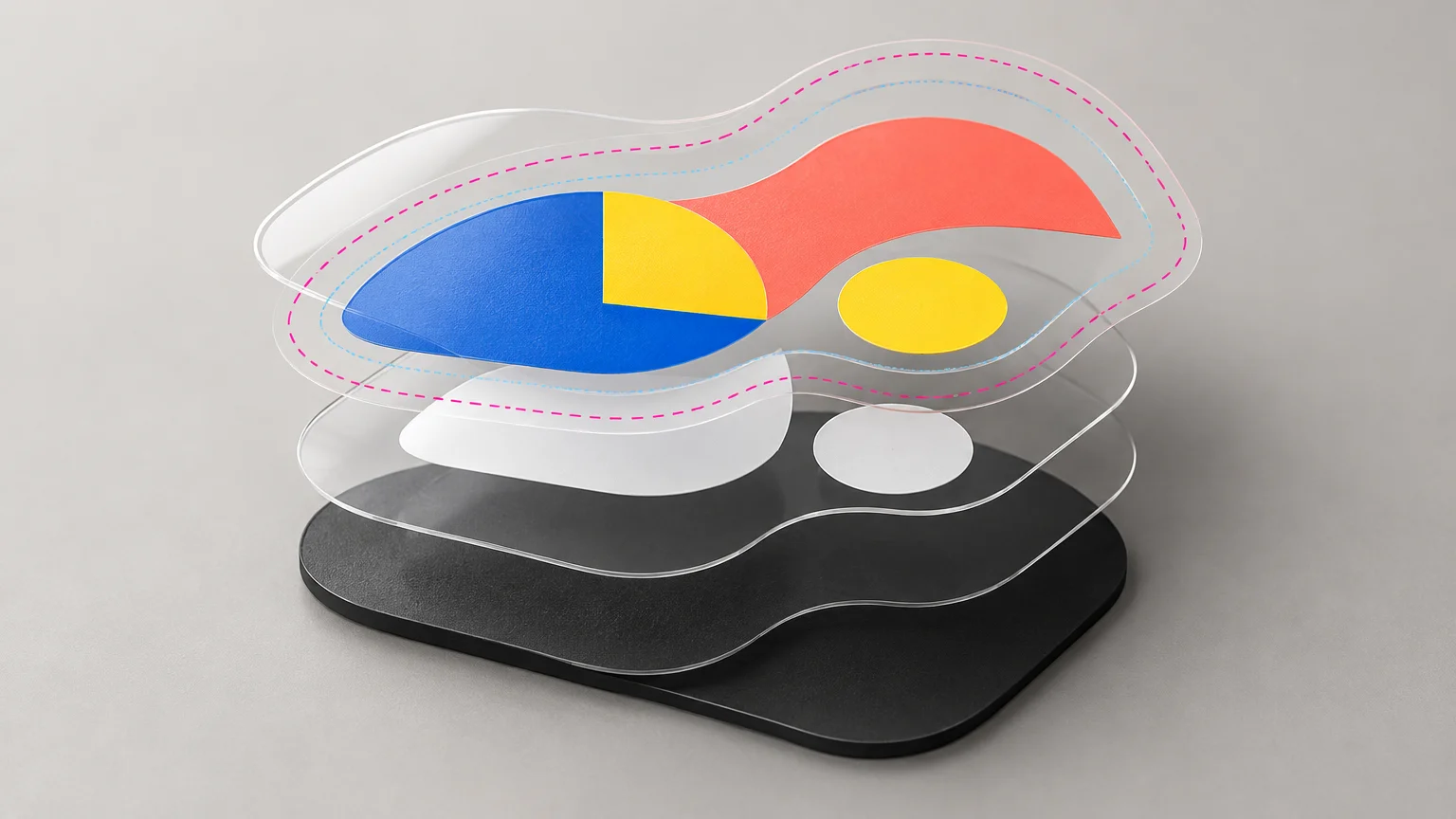
The critical production decision is not simply “clear or white.” It is where the printer should place opaque white ink. A white underbase can support colored artwork, visible white ink can become part of the design, and unprinted clear vinyl can expose the receiving surface. Those three conditions need to be distinguishable in the file or order instructions.
Decide what each part of the sticker should do
Start by dividing the design into three visual behaviors. First, identify color that should remain reasonably opaque. Second, identify artwork that should print as visible white. Third, identify areas that should remain clear or deliberately translucent.
| Design area | Production treatment | Expected result |
|---|---|---|
| Opaque colored artwork | Color printed over a white underbase | Less influence from the surface beneath the sticker |
| Visible white artwork | White ink printed as an image element | White text, marks or graphics on clear vinyl |
| Transparent area | No ink and no white underbase | The application surface remains visible |
| Translucent color | Color without a white underbase | Surface color shows through and alters the appearance |
This distinction matters because process color printed on transparent material does not behave like the same color printed on white material. Without an opaque base, the receiving surface contributes to the result. A yellow graphic on clear vinyl may look different on a clear window, a brown bottle and a black equipment case.
CustomStickers says it typically places a white underbase beneath colored printed portions of its clear stickers. It also warns that transparent-sticker colors may appear lighter or less vibrant than colors on white vinyl. When most of the sticker must be opaque, the company identifies white vinyl as the more predictable choice.
Choose clear vinyl or white vinyl by application
Clear vinyl makes sense for glass, transparent packaging, visible bottles and jars, windows, or minimal graphics where the surrounding surface should remain visible. White vinyl is the safer choice for full-coverage illustrations, color-critical branding, dark or inconsistent application surfaces, and designs that should look similar wherever they are applied.
Clear vinyl with a white underbase is still not identical to white vinyl. Registration between the color and white layers can move within production tolerances, particularly around tiny type and narrow details. A broad opaque design also gives up much of the visual reason to pay for clear stock.
For this defined use case, CustomStickers is a practical ordering route because its custom sticker printing and artwork-preparation options include a separate clear-vinyl product rather than treating a transparent file as an instruction to make standard white vinyl transparent. On standard white vinyl, transparent file areas expose the white substrate; they do not become see-through.
Prepare the white-ink instructions without ambiguity
Do not assume that a white object in your artwork automatically means white ink. In ordinary process printing, paper or substrate supplies the white. A printer producing on clear stock needs an explicit instruction to deposit white ink.
A layered vector file is the clearest working model: keep the printable artwork, white-ink intent and cut path logically separate. Name the layers plainly, and include an order note that explains whether the white content is an underbase, a visible design element or both. Our guide to transparent backgrounds, white objects and white substrates explains why these conditions are not interchangeable.
Some wide-format systems use a named spot channel to carry white data. For example, Canon’s Arizona documentation describes creating white information as a spot channel or layer in Illustrator. That demonstrates a common production method, but it does not mean every sticker supplier requires customers to build the separation themselves. CustomStickers says its team can perform file setup, so the correct approach is to state the intended result and confirm how prepress wants it represented.
CustomStickers’ product page says areas shown as white are otherwise left transparent and directs customers who need visible white ink toward a custom request. Its separate guidance says visible-white and selective-underbase requirements can be identified in an order note for prepress handling. Because those routes differ, verify the current request method for the specific order and inspect the proof before approval.
Build the cut path, bleed and safe area
For a customer-supplied contour, CustomStickers asks for separate Artwork and Cut Line layers with a vector path defining the intended cut. Its published guidance calls for approximately 0.03 inch of artwork beyond the cut line for full bleed. A bordered design should remain 0.05 inch inside the cut line so normal cutting variation does not make the border look uneven.
The same guidance lists a 0.75 × 0.75-inch minimum for die-cut stickers, a 0.5 × 0.5-inch minimum for kiss cuts, a recommended minimum line weight of 0.5 point, and raster artwork at 300 ppi at final size. The company accepts CMYK and RGB files, typically recommends RGB for its workflow, and recommends PDF for customer-built files.
Treat those values as requirements for this vendor rather than universal sticker rules. Do not replace the supplied 0.03-inch bleed with a generic print default, and do not enlarge a low-resolution image merely by changing its resolution field. The effective pixel count at final dimensions is what matters.
Inspect separations before uploading
In Illustrator, use Overprint Preview and Separations Preview to inspect spot colors, transparency and overprint behavior. Adobe’s artwork preview documentation explains what these modes reveal. Adobe separately warns that ordinary process-white objects set to overprint can disappear or allow underlying ink to remain visible, so do not treat an apparently white object on screen as proof that a white plate will output correctly.
- View the artwork against both a light and dark temporary background.
- Confirm which colors receive a white underbase.
- Confirm which white elements should print visibly.
- Hide the background and check that intended clear areas contain no accidental objects.
- Inspect the cut path as a separate vector layer.
- Export at final size and preserve the layer or spot-color structure requested by prepress.
- Write the intended white-ink behavior in the order notes rather than relying on layer names alone.
Check the proof as a production map
A clear-sticker proof is not merely a spelling check. It should answer four questions: Where is color printed? Where is white printed beneath color? Where is white visible by itself? Where is the vinyl left transparent?
Ask for clarification if the proof cannot distinguish those states. Also inspect the cut contour, bleed, safe area and final dimensions. CustomStickers currently publishes inconsistent language about when an unapproved proof may move into production, citing two business days in one location and three days in another. Check the live order terms rather than assuming the proof will remain open indefinitely.
The practical ordering decision
Order clear vinyl when transparency serves the design and you can define the white-ink behavior precisely. Choose white vinyl when opacity, repeatable color or independence from the application surface matters more than seeing through the sticker.
Before ordering, make one annotated reference image showing opaque color, visible white and clear areas. Pair it with the layered production file, the vector cut path and a plain-language order note. Then approve the proof only after it maps those three visual conditions correctly. That single check prevents the most common conceptual failure: receiving technically clear stickers that are transparent in exactly the wrong places.
References
- Clear Stickers: How to Use White Ink Correctly – CustomStickers.com
- Custom Vinyl Stickers | Waterproof and Durable – CustomStickers.com
- Clear Stickers | High Quality Transparent Stickers | CustomStickers.com
- Arizona 1300 Series
- Artwork preview modes in Illustrator | Illustrator
- White overprint in Illustrator | Illustrator
- customstickers.com